Wazuh
1. Description
Wazuh est une solution open-source de SIEM (Security Information and Event Management) et XDR (eXtended Detection and Response) permettant à partie de corrélation de logs pour détecter des incidents de sécurité et remonter des alertes.
2. Informations
2.1. wazuh1.home.lab
| Caractéristiques | |
|---|---|
| RAM | 6 Go |
| CPU | 2 coeurs |
| Disque | 10Go + 20Go /data |
| Hostname | wazuh1.home.lab |
| IP admin | 192.168.50.30 |
- il faut au minimum 4 Go de RAM et 2 cœurs en CPU
2.2. Fichier terraform
module "wazuh1" {
  # module proxmox
  source         = "../../modules/proxmox"
  # proxmox
  pm_api_token = var.pm_api_token
  # tofu
  vm_hostname = "wazuh1"
  vm_domain = "home.lab"
  vm_tags = [ "almalinux9", "monitoring" ]
  # cloud-init
  vm_ipv4_address = "192.168.50.30/24"
  vm_ipv4_gateway = "192.168.50.201"
  # hardware
  vm_memory = 6142
}
3. Préparation des partitions
3.1. Créer la partition /data
$ sudo vgcreate vg1 /dev/vdb
$ sudo lvcreate -n data -l 100%FREE vg1
$ sudo mkfs -t ext4 /dev/vg1/data
$ sudo mkdir /data
3.2. Modifier le fichier /etc/fstab
/dev/vg1/data /data ext4 defaults 0 0
3.3. Relancer le daemon
$ sudo systemctl daemon-reload
$ sudo mount -a
3.4. Préparer les répertoires pour l'installation de Wazuh
$ sudo mkdir -p /data/var/log/ossec
$ sudo mkdir -p /data/var/ossec/
$ sudo mkdir -p /data/usr/share/wazuh-indexer

$ sudo ln -s /data/var/log/ossec /var/log/ossec
$ sudo ln -s /data/var/ossec /var/ossec
$ sudo ln -s /data/usr/share/wazuh-indexer /usr/share/wazuh-indexer
4. Installation
4.1. Télécharger le script d'installation wazuh-install.sh
$ curl -sO https://packages.wazuh.com/4.12/wazuh-install.sh
4.2. Exécuter le script d'installation wazuh-install.sh
$ sudo bash ./wazuh-install.sh -a
17/05/2025 09:03:46 INFO: Starting Wazuh installation assistant. Wazuh version: 4.12.0
17/05/2025 09:03:46 INFO: Verbose logging redirected to /var/log/wazuh-install.log
17/05/2025 09:03:46 INFO: The recommended systems are: Red Hat Enterprise Linux 7, 8, 9; CentOS 7, 8; Amazon Linux 2; Ubuntu 16.04, 18.04, 20.04, 22.04.
17/05/2025 09:03:46 WARNING: The current system does not match with the list of recommended systems. The installation may not work properly.
17/05/2025 09:03:46 INFO: Verifying that your system meets the recommended minimum hardware requirements.
17/05/2025 09:03:46 INFO: Wazuh web interface port will be 443.
17/05/2025 09:03:46 INFO: --- Dependencies ---
17/05/2025 09:03:46 INFO: Installing lsof.
17/05/2025 09:03:49 WARNING: The system has Firewalld enabled. Please ensure that traffic is allowed on these ports: 1515, 1514, 443.
17/05/2025 09:03:50 INFO: Wazuh repository added.
17/05/2025 09:03:50 INFO: --- Configuration files ---
17/05/2025 09:03:50 INFO: Generating configuration files.
17/05/2025 09:03:50 INFO: Generating the root certificate.
17/05/2025 09:03:50 INFO: Generating Admin certificates.
17/05/2025 09:03:51 INFO: Generating Wazuh indexer certificates.
17/05/2025 09:03:51 INFO: Generating Filebeat certificates.
17/05/2025 09:03:51 INFO: Generating Wazuh dashboard certificates.
17/05/2025 09:03:51 INFO: Created wazuh-install-files.tar. It contains the Wazuh cluster key, certificates, and passwords necessary for installation.
17/05/2025 09:03:52 INFO: --- Wazuh indexer ---
17/05/2025 09:03:52 INFO: Starting Wazuh indexer installation.
17/05/2025 09:05:27 INFO: Wazuh indexer installation finished.
17/05/2025 09:05:27 INFO: Wazuh indexer post-install configuration finished.
17/05/2025 09:05:27 INFO: Starting service wazuh-indexer.
17/05/2025 09:05:58 INFO: wazuh-indexer service started.
17/05/2025 09:05:58 INFO: Initializing Wazuh indexer cluster security settings.
17/05/2025 09:06:08 INFO: Wazuh indexer cluster security configuration initialized.
17/05/2025 09:06:08 INFO: Wazuh indexer cluster initialized.
17/05/2025 09:06:08 INFO: --- Wazuh server ---
17/05/2025 09:06:08 INFO: Starting the Wazuh manager installation.
17/05/2025 09:07:48 INFO: Wazuh manager installation finished.
17/05/2025 09:07:48 INFO: Wazuh manager vulnerability detection configuration finished.
17/05/2025 09:07:48 INFO: Starting service wazuh-manager.
17/05/2025 09:08:03 INFO: wazuh-manager service started.
17/05/2025 09:08:03 INFO: Starting Filebeat installation.
17/05/2025 09:08:03 INFO: Starting Filebeat installation.
17/05/2025 09:08:19 INFO: Filebeat installation finished.
17/05/2025 09:08:34 INFO: Filebeat post-install configuration finished.
17/05/2025 09:08:34 INFO: Starting service filebeat.
17/05/2025 09:08:35 INFO: filebeat service started.
17/05/2025 09:08:35 INFO: --- Wazuh dashboard ---
17/05/2025 09:08:35 INFO: Starting Wazuh dashboard installation.
[...]
4.3. Ouvrir les ports 443, 1515, 1514 sur firewalld
$ sudo firewall-cmd --permanent --add-port=443/tcp
$ sudo firewall-cmd --permanent --add-port=1514/tcp
$ sudo firewall-cmd --permanent --add-port=1515/tcp
5. Envoi des logs vers le serveur wazuh
5.1. Configurer le service rsyslog
- Créer le fichier
/etc/rsyslog.d/wazuh.conf
*.* action(type="omfwd" target="wazuh1.home.lab" port="1514" protocol="tcp")
5.2. Configurer SELinux
- Le flux syslog d'envoi des logs sur le port non standard 1514/TCP (au lieu de 514/TCP) est bloqué par
SELinux. On peut le voir avec la commande suivante :
$ sudo ausearch -m AVC,USER_AVC -ts recent
----
time->Mon May 19 20:52:47 2025
type=PROCTITLE msg=audit(1747680767.432:5837): proctitle=2F7573722F7362696E2F727379736C6F6764002D6E
type=SYSCALL msg=audit(1747680767.432:5837): arch=c000003e syscall=42 success=no exit=-13 a0=b a1=7fcbec00c8a0 a2=10 a3=0 items=0 ppid=1 pid=597623 auid=4294967295 uid=0 gid=0 euid=0 suid=0 fsuid=0 egid=0 sgid=0 fsgid=0 tty=(none) ses=4294967295 comm=72733A6D61696E20513A526567 exe="/usr/sbin/rsyslogd" subj=system_u:system_r:syslogd_t:s0 key=(null)
type=AVC msg=audit(1747680767.432:5837): avc:  denied  { name_connect } for  pid=597623 comm=72733A6D61696E20513A526567 dest=1514 scontext=system_u:system_r:syslogd_t:s0 tcontext=system_u:object_r:unreserved_port_t:s0 tclass=tcp_socket permissive=0
- Pour autoriser le flux rsyslog sur le port non standard 1514/TCP, taper la commande suivante
$ sudo semanage port -a -t syslogd_port_t -p tcp 1514
5.3. Redémarrer le service rsyslog
$ sudo systemctl restart rsyslog
6. Configuration de l'envoi des logs par ansible
Pour automatiser la configuration de l'envoi sur l'ensemble des serveurs linux du homelab, j'ai créé un rôle rsyslog
rsyslog
├── defaults
│   └── main.yml
├── handlers
│   └── main.yml
├── tasks
│   └── main.yml
└── templates
    └── rsyslog.d
        └── wazuh.conf.j2
6.1. defaults/main.yml
defaults/main.yml
---
rsyslog_service: "rsyslog"
rsyslog_host: "wazuh1.home.lab"
rsyslog_port: 1514
6.2. handlers/main.yml
handlers/main.yml
- name: "Restart rsyslog"
  ansible.builtin.service:
    name: "{{ rsyslog_service }}"
    state: restarted
6.3. tasks/main.yml
tasks/main.yml
- name: "Copy rsyslog.d/wazuh.conf file"
  template:
    src: "rsyslog.d/wazuh.conf.j2"
    dest: "/etc/rsyslog.d/wazuh.conf"
    mode: "0644"
  notify:
    - "Restart rsyslog"

- name: "Configure SElinux for syslog port {{ rsyslog_port }}"
  community.general.seport:
    ports: 1514
    proto: "tcp"
    setype: "syslogd_port_t"
    state: present
6.4. templates/rsyslog.d/wazuh.conf.j2
*.* action(type="omfwd" target="{{ rsyslog_host }}" port="{{ rsyslog_port }}" protocol="tcp")
7. Utilisation de Wazuh
7.1. Threat Hunting
-
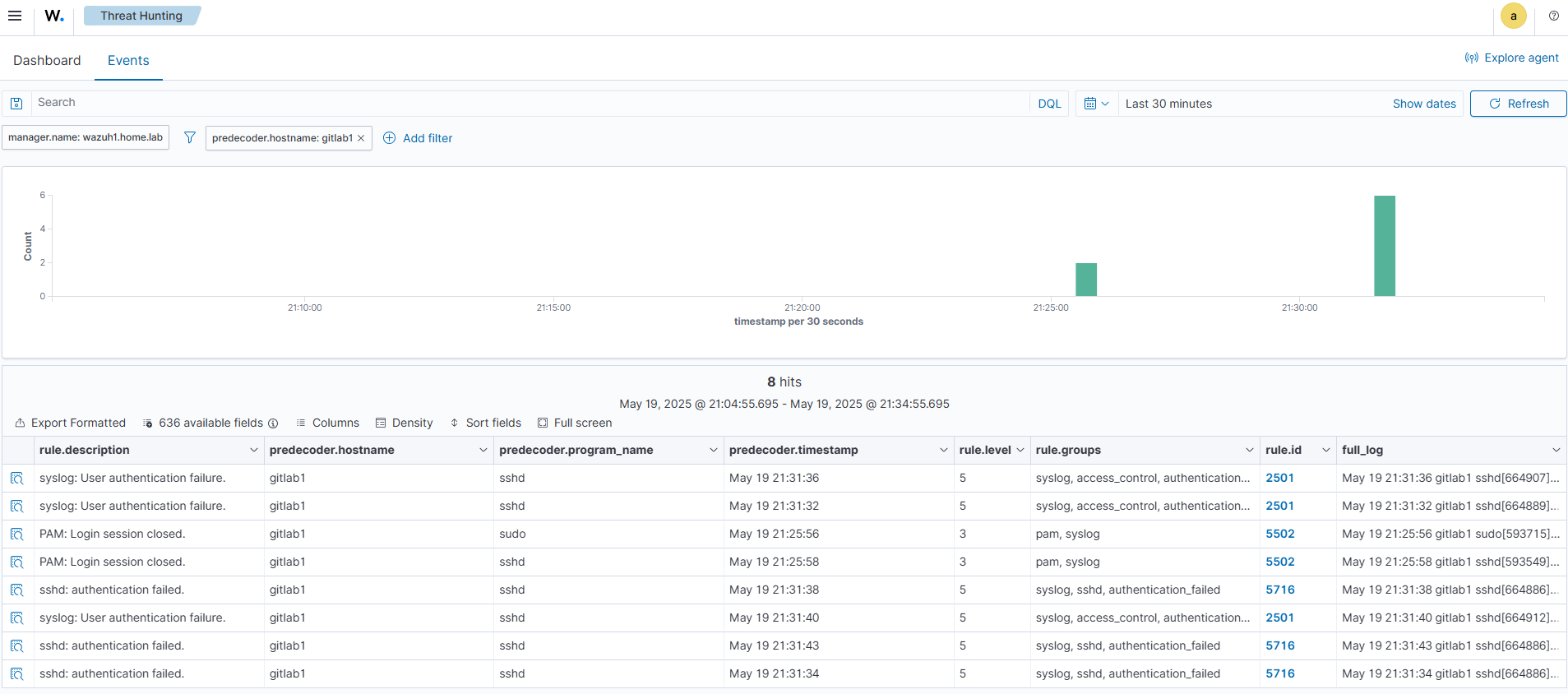
Pour voir les alertes, aller dans le menu "Theat intelligence" > "Treat Hunting" ; et cliquer sur l'onglet "Events"
-
Cliquer sur le bouton "available fields", et choisir par exemple :
- rule.description
- predecoder.hostname
- predecoder.program_name
- predecoder.timestamp
- rule.level
- rule.groups
- rule.id
- full_log
-
Utiliser sur le bouon "Columns" pour changer l'ordre des colonnes.
-
Voici un exemple de quelques règles créant des événements dans le SIEM
- mauvais mot de passe SSH
- fermeture de session SSH
8. Reset du mot de passe admin
- Utiliser le script https://packages.wazuh.com/4.4/wazuh-passwords-tool.sh